
Shorter queues. Fewer mistakes. Full view of your cloakroom.
The guest picks up a tag in the queue, clips it on their coat and pays with a tap. At the counter, staff just take the coat and hang it up. You watch revenue and occupancy live.
- Free to use
- No app for guests
- NFC and QR on every tag

Saturday 21:40, concert hall
Saturday 14 Sept, compared with last Saturday
600 tags in three sections
4 on duty tonight
The work moves down into the queue.
One cloakroom, one Saturday night. Watch what the counter does with paper tickets, and what it does with tapla.
- Four tasks at the counter become one: take the coat.
- The guest tags, pays and requests pickup from their own phone.
- You follow occupancy and revenue live.
A real tag, not just a screen
tapla is a physical tag on the coat and a ticket on the guest's phone. The tag is what the guest picks up in the queue, hooks on and taps — the software is everything that happens after that.
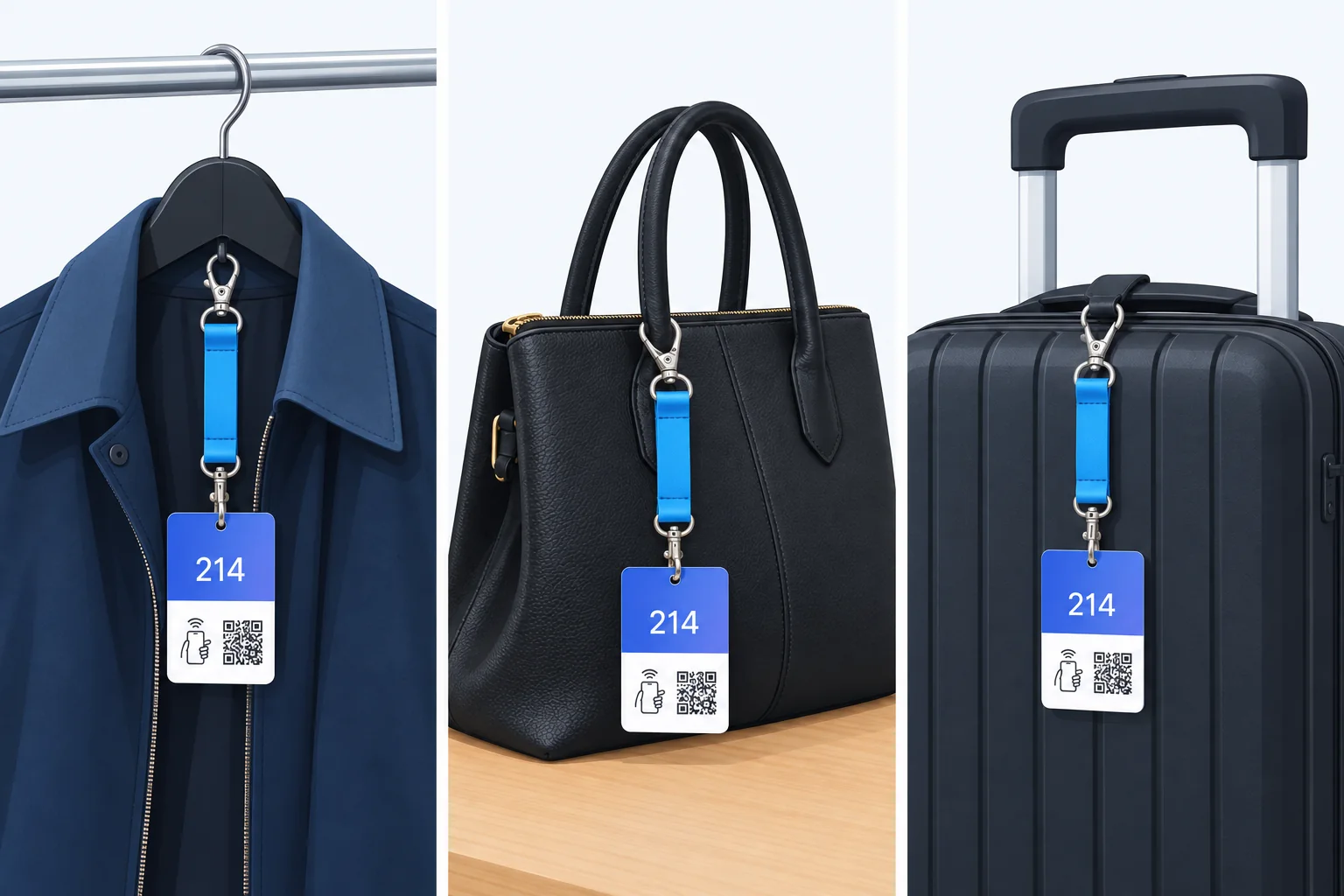
- A snap hook on a short strap. Hangs on the hanger, a zip pull or a bag handle — no pins, no marks.
- NFC and QR on the front, so every phone can open the ticket, with or without NFC.
- The code is random, not a running number — nobody can open someone else's ticket.
- Reused night after night. Hang it back in the holder and it is ready again.
Three layers
Up close the tag is a small sandwich: a printed front, an NFC inlay in the middle and a back with the guest's four steps. The chip sits between the layers, so there is nothing to wear off and nothing for the guest to operate.
Illustration of the build — not to scale.
- 1
Printed front
The number on the section colour, which is what staff read across the counter at arm's length. Under it, the tap mark and the QR code the guest scans.
- 2
NFC inlay
A thin antenna coil with the chip in the middle, sealed between the two faces. No battery, and it works without a network.
- 3
Back with the four steps
Tap or scan, type your phone number, hand over the coat and the tag, show your phone and get it back. The guest never has to ask.
- 4
The hole
Punched through all three layers at the top of the card. A snap hook on a short strap goes through it and hangs on a hanger, a zip pull or a bag handle — and unhooks again without leaving a mark.
Same queue. Same guests. Two counters.
Guests arrive at the same pace in both lanes. The difference is how much the staff must do before the next guest can step up.
With paper, the counter writes a number, takes payment, hangs the coat and hands over a ticket. With tapla, the guest already took a tag and paid while waiting. All that's left is taking the coat and hanging it up. Almost a minute per guest becomes a quarter of that, and the queue never gets a chance to grow.
The guest does the work while they're queuing anyway
The physical tag is the key. Because we supply tags with an NFC chip inside, the guest can take their own number, put it on their coat and pay, long before they reach the counter.
Joins the queue
At the entrance to the cloakroom stands a holder of tapla tags. The queue is the same as always, but now the guest uses the wait for something.
The holder stands 3–4 metres before the counter, so everyone has time to take a tag before they're at the front.Takes a number themselves
Every tag has a clear number and an NFC chip. The guest taps it with their phone, enters their number and now has a digital ticket that can't get lost.
Tap with the phone or scan the QR code. The ticket opens in the guest's own language, no app.Clips the tag on the coat
The tag is clipped on the coat while the guest queues. The number follows the garment from now on, not a slip of paper in a pocket.
The clip holds on anything from a wool coat to a rain jacket, and the tag is reused night after night.Pays in the queue with a tap
If the cloakroom charges, the guest pays on their phone while waiting. The receipt sits on the ticket, and nobody has to dig for cash at the counter.
Apple Pay, Google Pay or card. The receipt sits on the ticket, and you get the settlement in one place.Takes the coat and hangs it up
At the counter there's nothing left to do but take the coat and hang it on the hanger that matches the number. No tickets to write, no payment to take.
Section colours on tag and rail. The number is found in a second, even by a stand-in.Hands out on the guest's signal
When the guest swipes for pickup, the number appears on the display. The coat is found before the guest is at the front, and everyone can see what's ready.
The display faces the guests, so everyone can see what's ready and the queue sorts itself out.Built for the busy hour after the concert
Every feature exists for one reason: getting coats out faster and giving you peace of mind. First what the guest feels. Then what the staff feels. Finally what you see afterwards.
No app. No code. Just a tap.
The ticket opens in the phone's browser in the guest's own language. It can be saved to Apple Wallet or Google Wallet, so it's at hand even when the signal is poor in the basement.
- 15 languages for guests, ready from day one
- Payment in the queue or at the counter, whichever you prefer
- Your logo and colours on the ticket
- Swipe for pickup, and see live when the coat is ready
The ticket as the guest sees it, here in Danish and English. No download, no account.
Guests queue up before they reach the counter
When a guest swipes for pickup, the number goes up on a screen for the staff and one for the guests. The coat is found before the guest is at the front.
- Up to 300% faster handout at peak
- Choose the Simple or Premium flow, depending on how your cloakroom runs
- No PIN codes, no mixed-up coats
- Runs in a browser on a TV screen or iPad, no extra hardware
The guests' display. Orange means ready for pickup, blue is on the way.
The whole team on the same page, even on a busy Saturday
Invite colleagues with one link and give them exactly the role they need. Staff only see what they need at the counter.
- Roles for owner, lead and staff
- Section colours, so tags and hangers match
- Search by number or the last four digits of the phone number
- Set up in a day, with advice from us
The counter view. Newest requests at the top, forgotten coats collected at the bottom.
See what the cloakroom earns, night by night
Revenue, share paid in the queue and forgotten coats, per night and per season. Name an event, and see what it brought in.
- Settlement in one place, ready for the accounts
- Export to Excel when the auditor asks
- Forgotten coats are shown automatically, so you can follow up
- Compare events, halls and seasons
An example September. Saturdays carry the month, and you can plan for that.
Know when it gets hectic, and staff for it
Occupancy per half hour shows exactly when the coats come in, and when they have to go out again. That's the curve the rota should follow.
- Staff by numbers, not by gut feeling
- Recommended staffing computed from your own nights
- Compare with last Saturday or last season
- See in advance when the display gets busy
The 22:40 peak is where tapla saves the most time.
Measured in cloakrooms, not in a slide deck
tapla was developed together with people who have supplied cloakroom tickets to venues for over a decade. The system was tested in live operation before it was opened to everyone.
LIVE
A well-tested system, not an experiment. tapla was built and tried out together with one of the Nordics' major suppliers of traditional cloakroom tickets. It's their 12 years of experience from the counter that decided how the flow should feel. And it's that experience you get when we help you get started.

Anywhere lots of coats have to go out at once
Five kinds of places we built the flow for. Pick yours, and see what matters most right there.
When 1,500 guests want to go home at the same time
The concert ends and everyone heads for the cloakroom at once. With the pickup display the coats are found before the guest is at the counter, and the queue becomes a flow.
Fast at the counter, even at three in the morning
No tickets to lose, no PIN codes to remember. The guest taps, swipes and gets their coat. Staff avoid arguments and can keep the pace all night.
A professional impression from the first minute
Attendees get the ticket in their own language and can save it to Wallet. The organiser gets precise numbers on attendance and peak load for next year's planning.
Calm service that suits the place
No noisy system, no extra hardware beyond tags and a screen. Guests experience a cloakroom that just works, and you get numbers on the visit.
Cloakroom as a service, all day
Customers drop off coats and bags and collect them hours later. The phone number makes sure the right person gets the right thing back, with no paper to look after.
Free to use. No subscription, no lock-in.
The software costs nothing, no matter how many guests you have. You just need tapla tags for the hangers.
- Unlimited guests, coats and nights
- Dashboard, analytics and pickup display
- Unlimited users in the team
- Wallet tickets and 15 languages
- Advice on setting up your cloakroom
- Support in Danish and English
We store as little as possible, for as short as possible
A cloakroom ticket doesn't need to know who you are. It just has to match you with your coat for a few hours.
The phone number is deleted after pickup
The number is only used to match guest and coat. When the ticket is closed, it's gone. Meanwhile staff only see the last four digits.
Tags can't be guessed
Every tag has a random code, not a running number. You can't open someone else's ticket by counting up or down.
Payment through Stripe
Card details go straight to Stripe and never touch our servers. Data stays in the EU, and you get settlement and receipts in one place.
Staff only see what they need
Roles control access. The counter sees number, section and status. Revenue, exports and guest data are reserved for owner and lead.
What people ask before they get started
Missing an answer? Write to us and we'll get back the same day.
Contact usIs it really free?
Why does the guest take the tag themselves?
Do guests have to download an app?
What if a guest has an old phone without NFC?
What does the advice include?
How many tags do we need?
Can we run two counters?
What if the signal is poor in the basement?
What happens to the guests' phone numbers?
Ready for a cloakroom without a queue?
Create a free account, order demo tags and run the first night on tapla before the weekend. We help with the setup.